
Put your live flight map on your stream
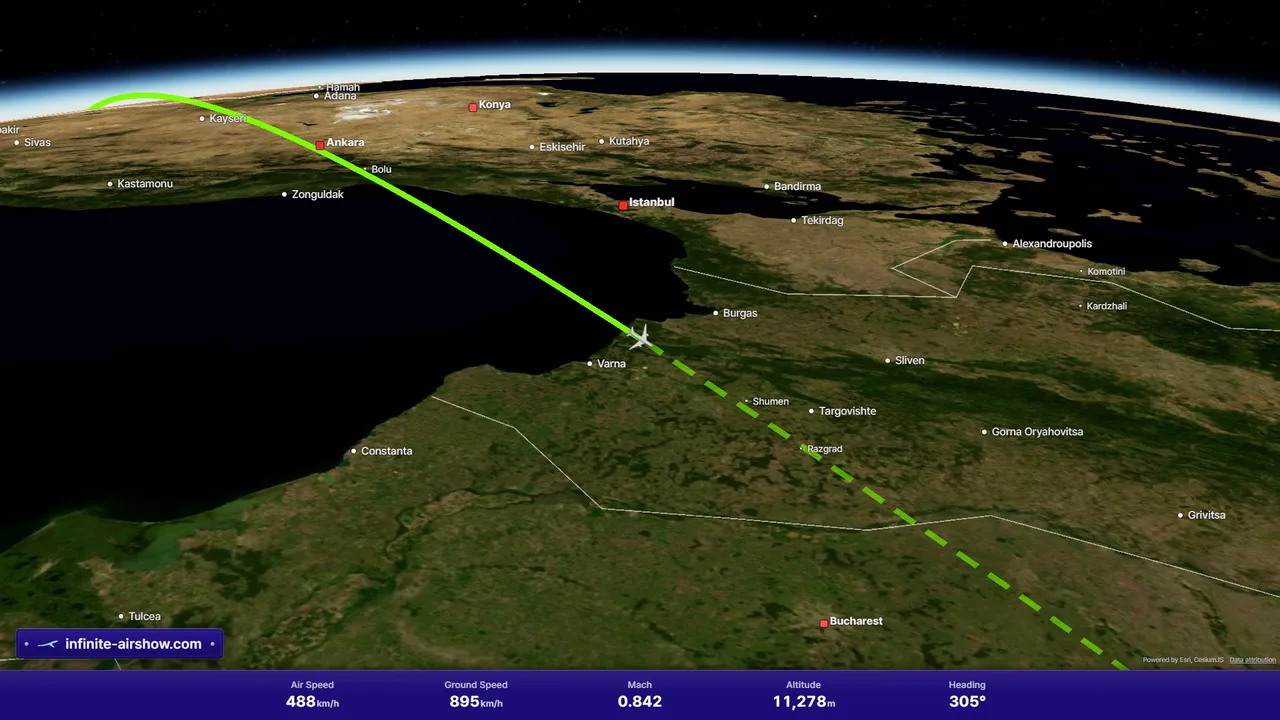
Add the flight you are flying to OBS Studio or Streamlabs Desktop as a browser source. Your viewers see the moving map, the route you have flown and the flight information band, live from Infinite Flight or VATSIM, with no buttons, cursor or sign-in prompts on screen.
Published by SFN Luca Co., Ltd. Updated .
What you need
- An Infinite Aeroshow account that can follow a live flight: the free 100-hour First Class trial, Economy Class or First Class.
- A live flight on an Infinite Flight server (Casual, Training or Expert) or on the VATSIM network.
- OBS Studio or Streamlabs Desktop on the computer you stream from.
1. Follow your flight
Open Infinite Aeroshow, choose the server you are flying on and select your flight with Track my flight.
2. Copy the overlay link
Press Invite next to the flight name, then Open boarding. Stream overlay (OBS) copies the link, which looks like https://www.infinite-airshow.com/w/…?overlay=1. It shows the same flight as your guest link.
3. Add a browser source
In OBS Studio, open Sources, press +, choose Browser and paste the link as the URL. Set the width to 1920 and the height to 1080. In Streamlabs Desktop, add a Browser Source with the same link and size.
4. Fit it into your scene
The overlay fills its source. Scale or crop it like any other source; on a 1280 × 720 canvas you can set the source to 1280 × 720 instead. Add &band=0 to the end of the link to hide the flight information band.
Recommended settings
- Size: 1920 × 1080, or 1280 × 720 for a 720p canvas. Keep 16:9.
- No custom CSS is needed. The overlay plays no sound and shows no cursor.
- Leave Shutdown source when not visible unchecked, so the map does not start over each time you switch scenes.
Infinite Flight and VATSIM
On VATSIM the overlay stays live for as long as the link is open. Infinite Flight's live data rules stop live maps after 15 minutes without input, so an Infinite Flight overlay then shows Live map paused. To resume, right-click the source, choose Interact and move the mouse over the map.
Infinite Aeroshow plans
- First Class free trial: 100 hours, no card needed
- Economy Class, monthly: $1.95 USD
- Economy Class, yearly: $16.20 USD
- First Class, monthly: $2.95 USD
- First Class, yearly: $23.40 USD
- First Class, lifetime: $99.95 USD
VAT may apply. Current plans and access terms.
Frequently asked questions
Which plans include the stream overlay?
Every account that can follow a live flight: the free 100-hour First Class trial, Economy Class and First Class. The overlay is the same link as Invite guests, opened as a browser source.
Is the stream overlay free?
It comes with live tracking. Every account can turn on 100 hours of First Class for free, with no card needed. After that, Economy Class is $1.95 a month and First Class $2.95 a month, with yearly and lifetime options.
Why does my Infinite Flight overlay pause?
Infinite Flight's live data rules stop live maps after 15 minutes without input, so the overlay then shows Live map paused. In OBS, right-click the source, choose Interact and move the mouse over the map to resume. VATSIM overlays do not pause.
How long does an overlay link work?
For one flight. It closes after the flight leaves the live map, when you close boarding or make a new link, and after 24 hours at most. For your next flight, open boarding again and paste the new link into the same browser source.
Can I remove the infinite-airshow.com plate?
No. The small plate in the bottom-left corner is part of every overlay. You can hide the flight information band by adding &band=0 to the link.
Do my viewers need an account?
No. The browser source opens the map without signing in. It shows this flight only, never your name or email.
Is Infinite Aeroshow affiliated with Infinite Flight or VATSIM?
No. Infinite Aeroshow is an independent service by SFN Luca Co., Ltd. and is not affiliated with Infinite Flight LLC or VATSIM.
Infinite Aeroshow is an independent service by SFN Luca Co., Ltd. and is not affiliated with Infinite Flight LLC or VATSIM.