Infinite AeroshowEconomy
- Monthly
- $1.95
- Yearly
- $16.2031% off
- 3D moving map, ad-free, unlimited use
- Track my flight and Explore
- Map layers, airport cards and flight info
- Landing card for Infinite Flight
Seat58K
See EconomyLanding card
When a flight you follow touches down, Infinite Aeroshow opens a landing card with the touchdown rate from Infinite Flight's own touchdown record, stamped Butter, Smooth, Firm or Hard. Here's what each stamp means, and how to land softer.
100h First Class free · No card needed · No install · Infinite Flight live servers
How to see it
The landing card works for flights on Infinite Flight's live servers. Start following before the flight lands, ideally on a second screen.
Join an Infinite Flight live server, Casual, Training or Expert, and fly as usual.
Sign in on a second screen, choose your server and search your callsign in Track my flight.
When the wheels touch, the landing card opens with your touchdown rate and its stamp.
The card opens only for a flight Infinite Aeroshow has seen in the air, once per flight, so open the flight before it lands.
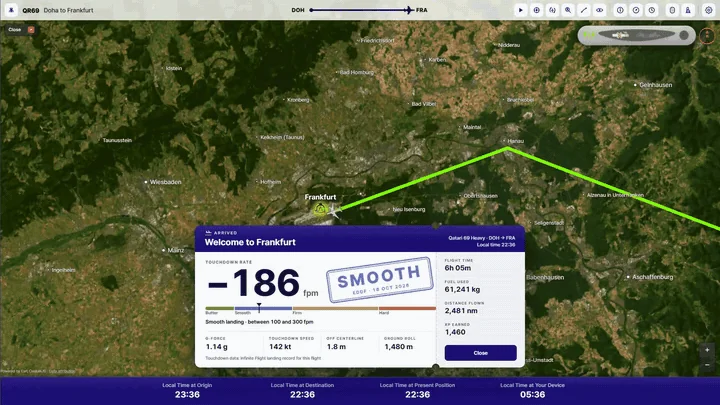
When the flight you follow touches down, an arrival card opens over the map, welcoming you to the destination city with its local time. It shows:
Rows without data are left out. Close the card with Close or the Esc key.
The stamp depends on the touchdown rate alone:
| Stamp | Touchdown rate |
|---|---|
| Butter | Under 100 fpm |
| Smooth | 100 to under 300 fpm |
| Firm | 300 to under 600 fpm |
| Hard | 600 fpm or more |
These bands are Infinite Aeroshow's own, not an official Infinite Flight or airline rating. G-force, speed and the other numbers don't change the stamp, and the stamp doesn't change anything in your Infinite Flight account.
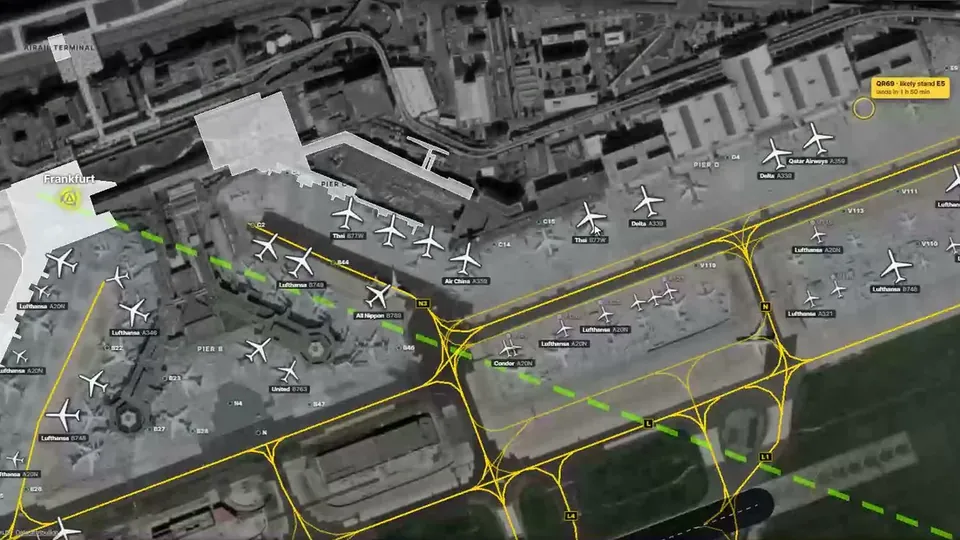
Economy: weather and runways, traffic, ATC and a ground map for your arrival airport.
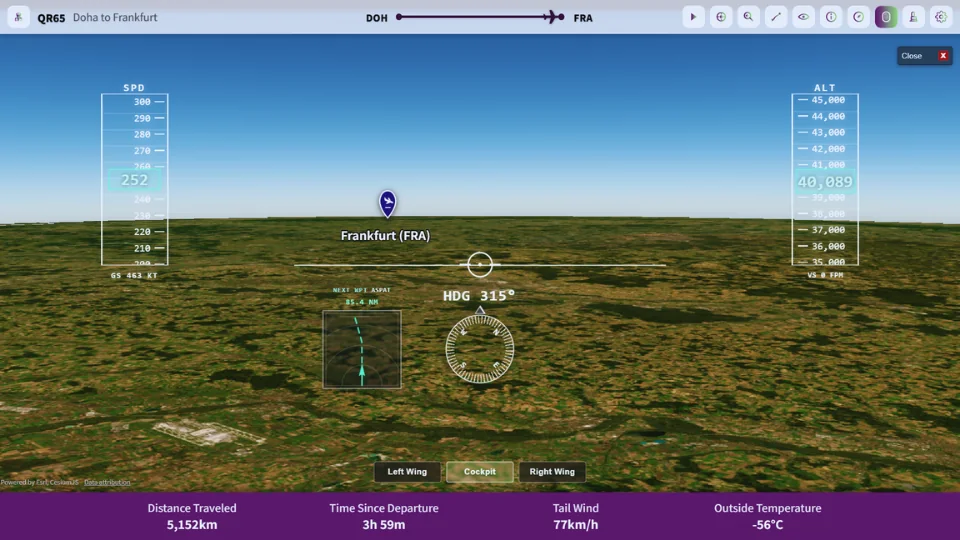
First Class: speed, altitude and heading tapes with a navigation display, all the way down the approach.
Infinite Flight publishes a touchdown record for each flight on its live servers, with the vertical speed, g-force, speed, distance from the centerline and ground roll of every landing. When the flight you follow lands, Infinite Aeroshow asks Infinite Flight for that record and converts the vertical speed to feet per minute. If the flight touched down more than once, as with touch-and-goes, the card shows the last landing.
If the record isn't available yet when the flight lands, the card shows an estimate instead: the last descent rate the live data showed in the air, marked ≈, without a stamp or the touchdown numbers. While the card stays open, it checks once more five minutes later and stamps itself if the record has arrived.
Infinite Aeroshow doesn't keep a history of landings. The card is gone once you close it, so take a screenshot if you want to keep one.
Landing tips
A good landing starts well before the runway. These habits help in any aircraft, from a light single to a wide-body jet.
There's no single Infinite Flight landing speed. The right speed depends on the aircraft type, its landing weight, the flap setting and the wind, so fly the approach speed for your aircraft and weight, with a few knots more in gusty wind. The card's Touchdown speed row shows the speed you actually landed at, so you can compare one flight with the next.
Plans
The landing card is in Economy and First Class. Every account starts with 100 hours of First Class, counted from the moment you turn it on. No card needed. Prices are in USD; VAT is added at checkout where it applies.
Seat58K
See EconomyOr $99.95 once, for life
Cancel future renewals anytime; access stays until the end of the billing period. Compare every feature
FAQ
A very soft touchdown. Infinite Aeroshow's landing card stamps a touchdown rate under 100 feet per minute as Butter, 100 to under 300 as Smooth, 300 to under 600 as Firm and 600 or more as Hard. These are our own bands, not an official Infinite Flight rating.
From the touchdown record Infinite Flight publishes for each flight on its live servers. Infinite Aeroshow reads it when the flight you follow lands and shows the last landing in it, in feet per minute.
Infinite Flight's touchdown record wasn't available yet when the flight landed. The card shows the last descent rate seen in the air, marked ≈ and without a stamp, and checks once more five minutes later while it stays open.
No. It needs the touchdown record Infinite Flight publishes, so it's for Infinite Flight flights only. VATSIM flights still appear on the moving map.
Economy and First Class, and the 100-hour First Class free trial every account starts with, no card needed. After the trial, Economy is $1.95 a month or $16.20 a year, and First Class is $2.95 a month, $23.40 a year or $99.95 once. Prices are in USD, and VAT is added at checkout where it applies.
No. Infinite Aeroshow is an independent service by SFN Luca Co., Ltd. and is not affiliated with Infinite Flight LLC or VATSIM.
Departures
| Flight | Destination | Status |
|---|---|---|
| IA 101 | Infinite Flight live tracker | On time |
| IA 707 | How to track your flight | On time |
| IA 330 | Infinite Flight landing rate | Now boarding |
| IA 110 | iPad, Android and TV setup | On time |
| IA 909 | Share your flight live | On time |
| IA 220 | Flight sim passenger view | On time |
| IA 404 | Plans and pricing | Gate open |